
AI-AI-OH!!

Bounty Bay is about calm, practical work for the digital world — helping people make sense of everyday technology in a way that feels human, ethical, and grounded in real life.
I work across IT support, learning design, and everyday digital problem‑solving, and one of the most common things I hear at the moment is:
“I don’t really understand AI, but I feel like I should be using it.”
AI is suddenly everywhere — in our phones, our inboxes, our workplaces, and even our creative tools.
Some people are excited.
Some are anxious.
Many are confused.
And almost everyone is hearing mixed messages about what AI can and can’t actually do.
So this is my calm, practical take on what AI actually is, what it’s genuinely useful for, and how to use it in a way that’s ethical, grounded, and safe.
AI Is Not a Magic Truth Machine
There are many myths about what AI is capable of, and a lot of uncertainty about what information or images we can trust.
AI doesn’t “know” things in the human sense. It predicts words and patterns based on enormous amounts of training data. That’s why it can sound confident while being completely wrong.

This is what people now call hallucination — when an AI invents facts, sources, quotes, or details that simply aren’t true.
That’s why:
- You should stick with trusted sources
- You should always cross‑check anything important
- You should never assume AI output is automatically factual
Some people use AI to avoid doing the work themselves. That can be a dangerous game.
Are they fact‑checking?
Are they noticing when the AI is hallucinating?
Are they getting credit for work generated by a machine while colleagues are doing legitimate, careful work?
AI can be a powerful assistant — but it is not a replacement for thinking, judgement, or professional responsibility.
My Personal Stance on AI
AI can be a great time‑saver and can increase productivity massively — if it’s used properly and the information is verified before publishing, sharing, or acting on it.
I see AI as:
- A thinking partner
- A drafting assistant
- A research helper
- A productivity tool
Not as an authority.
Not as a truth engine.
Not as a substitute for human care and accountability.
“People Think I’ve Lost the Plot…”
People think I’ve lost the plot because I say please and thank you to my AIs.
I was brought up to be polite — but more importantly, I’ve learned something practical:
When you speak to AI naturally, you get better results.
If you talk to it like a human, you:
- Explain context more clearly
- Ask better questions
- Refine things more thoughtfully
- Don’t get stuck over‑engineering prompts
It becomes a conversation, not a command line.
I also know that when you tell an AI it is an expert at something, you are much more likely to get back something factual, structured, and usable.
For example:
“You are an experienced Microsoft 365 trainer.
Please explain this in simple, non‑technical language for a beginner.”
Knowing a few good scripts like this will take you a very long way.
Choose the Right Tool for the Job
There isn’t one “best” AI.
There are only tools that are better or worse for the job you’re trying to do.
You can get results from sticking to one tool — but it’s far more effective to play to the strengths of different models.
Here’s my calm, real‑world shortlist:
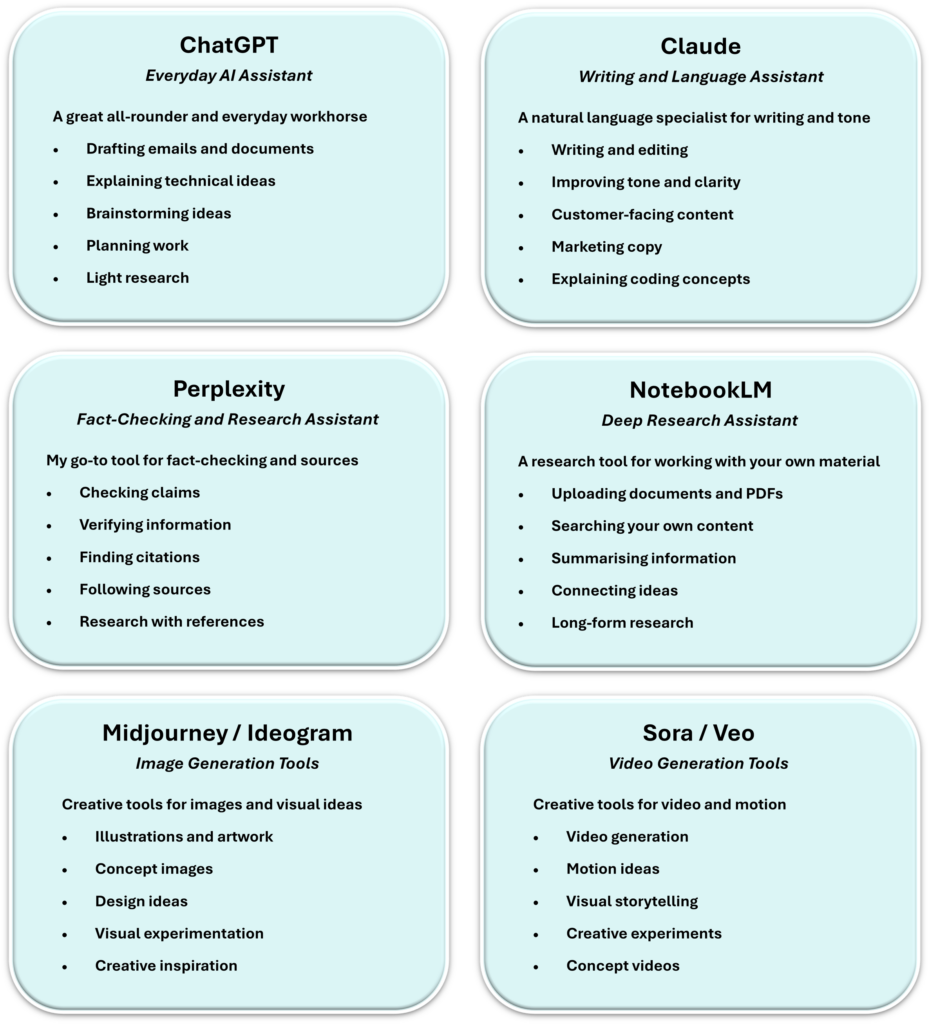
Each one has different strengths for images, video, music, and creative experimentation.
A Real Example: When AI Gets It Almost Right (But Still Wrong)
I recently asked an AI image tool to:
“Generate a cartoon image of a robot reading a book upside-down.”
What I got back was… entertaining.
In the first attempt, the robot was reading a book the right way up —
the text was just mirrored.
In the second attempt, the same thing happened again.
In the third attempt, the robot itself was upside-down —
but the book was still oriented correctly to the robot.
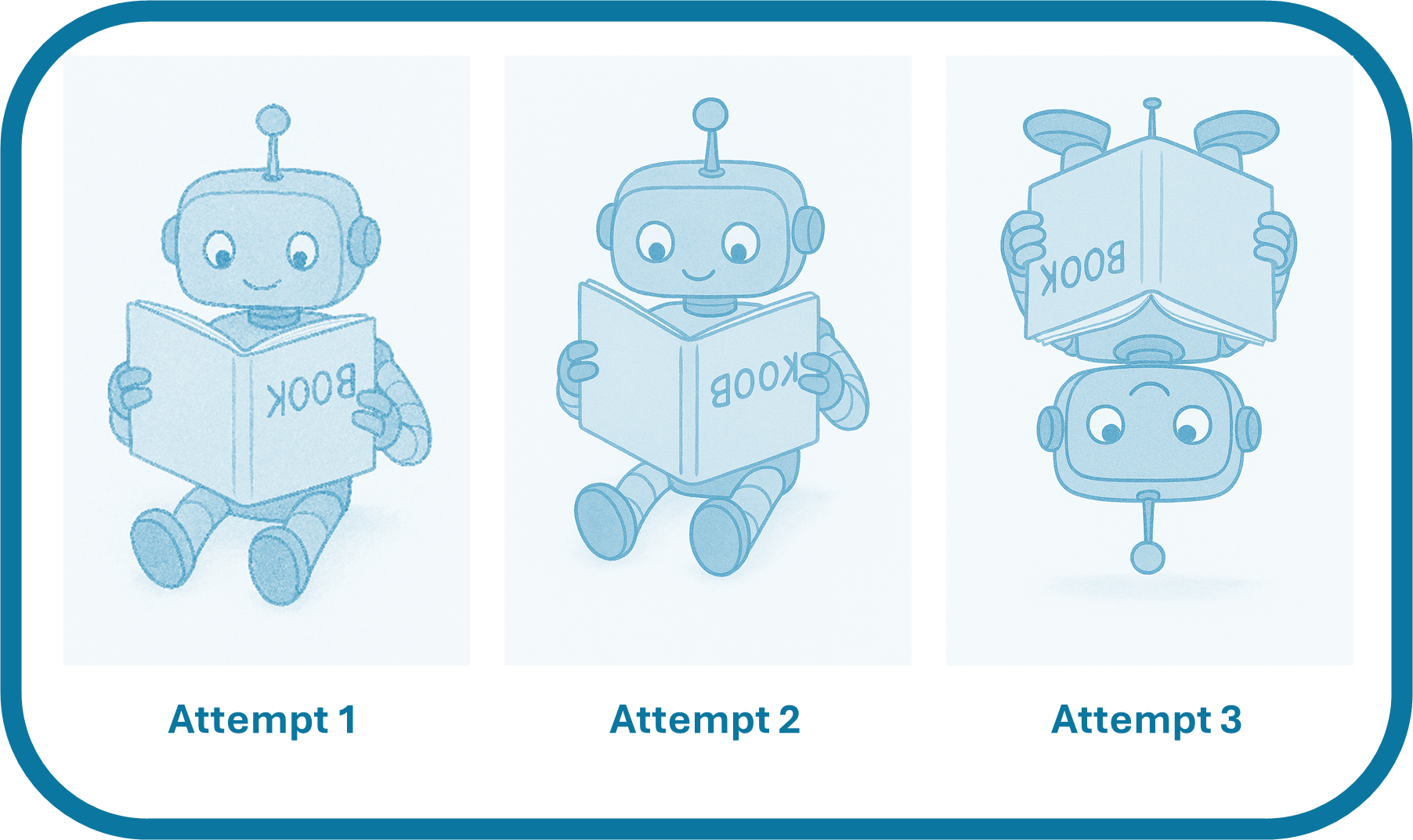
So technically, the robot still wasn’t reading an upside-down book at all.
It looked right at a glance.
It felt like progress.
But it still wasn’t what I’d hoped for.
This is a perfect example of how AI can sound (or look) confident
while quietly getting the details wrong.
Postscript:
I tried once more.
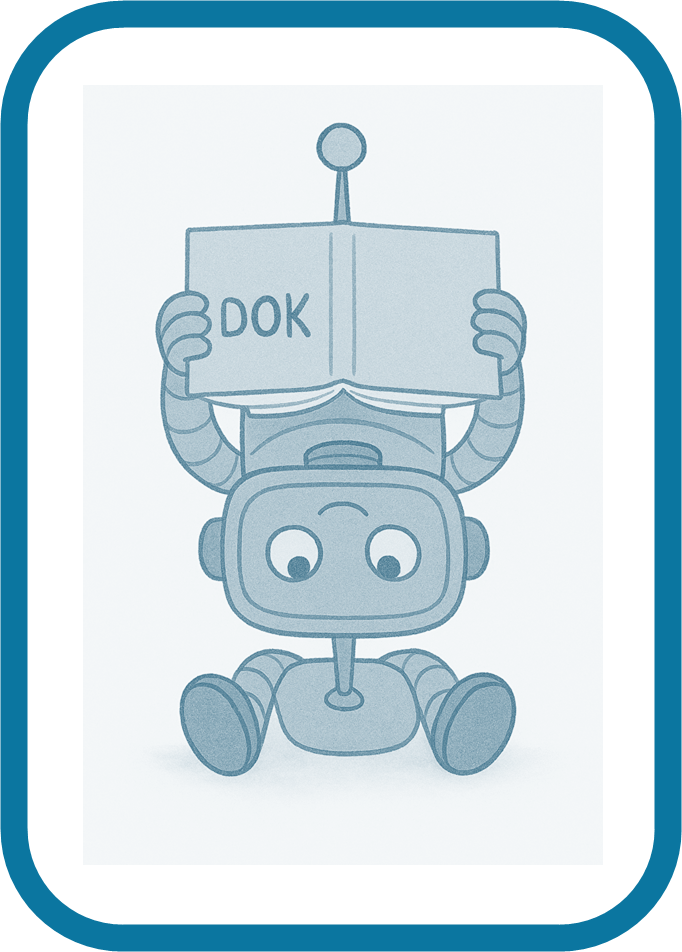
This time the robot held the book above its head, almost.
The text was nonsense.
Half of the robot was still upright.
At this point I stopped.
AI wasn’t learning what I meant. It was just generating new and increasingly strange guesses.
Which is exactly why human judgement still matters.
A Serious Word on Privacy and Personal Data
Whichever AI tools and models you choose to use:
Do not — I repeat — do not copy and paste personal or sensitive information into any AI tool.
Always redact first.
This includes:
- Names
- Email addresses
- Phone numbers
- Client details
- Financial information
- Medical information
- Anything you wouldn’t post publicly online
AI tools are not private notebooks. They are external services.
A Calm Conclusion
Used thoughtfully, AI can be an extraordinary assistant.
It can help you:
- Think more clearly
- Work more efficiently
- Learn faster
- Draft better
- Explore ideas more creatively
Used carelessly, it can:
- Spread misinformation
- Create false confidence
- Undermine trust
- Expose private data
My approach is simple:
Be curious.
Be critical.
Be ethical.
Be human.
AI should make your work better — not lazier, riskier, or less thoughtful.
How I Can Help
If AI feels interesting but also slightly overwhelming, you’re not alone.
Most people I work with aren’t looking to become AI experts.
They just want to:
- Work more efficiently
- Reduce digital friction
- Feel more confident using modern tools
- Avoid making mistakes with data, accuracy, or privacy
This is where I can help.
Depending on your needs, I offer calm, practical support such as:
- Everyday AI guidance
Helping you understand what tools are useful for your role or business, and how to use them safely and ethically. - AI for productivity
Using AI alongside tools like Microsoft 365 to draft emails, summarise information, organise work, and think more clearly. - Digital confidence building
One‑to‑one or small‑group support to help you feel calmer and more capable with everyday technology. - Training and learning design
Bespoke guidance, workshops, or learning resources for teams who want a grounded, non‑hype introduction to AI and modern digital working.
I don’t sell tools.
I don’t push trends.
I don’t promise magic.
I help people use technology thoughtfully, responsibly, and with confidence.
A Bounty Bay Closing Note
Bounty Bay exists to help people feel calmer and more confident in a digital world that often feels noisy, rushed, and overwhelming.
Whether I’m working with someone on Microsoft 365, everyday IT problems, digital organisation, learning design, or newer tools like AI, my approach is always the same:
- Make things clear
- Make things usable
- Make things ethical
- Make things human
If you’re curious about using AI in a thoughtful, practical way — or if you’d like help building digital confidence more generally — you’re very welcome to explore the rest of Bounty Bay.
This isn’t about chasing trends.
It’s about doing calm, practical work for the digital world.


Logbook
This section offers a summary of the logbook, presenting a range of articles, perspectives, and materials to educate and motivate readers.
-

AI is Powerful. Skills Still Matter
The conversation around AI seems to have changed dramatically in a very short space of time. A year ago, many people were asking whether AI would replace workers. Today, I am increasingly hearing concerns about cost, reliability, trust, and the skills needed to…
-
AI Guidance for Young People
Artificial Intelligence is becoming part of everyday life, and young people are growing up with tools that can answer questions, generate content, and help with learning in ways previous generations never experienced. Used well, AI can be a valuable support tool. Used poorly,…

Leave a Reply